
Table of Contents
A Bold Entry Into Premium
The OnePlus 7 Pro marked a new chapter for OnePlus. Unlike earlier models, which focused on affordability, this device stepped into the premium range. With a refined design, advanced cameras, a fluid display, and Warp Charge technology, it quickly became a favorite for users who wanted both performance and style.
Physical Design and Layout
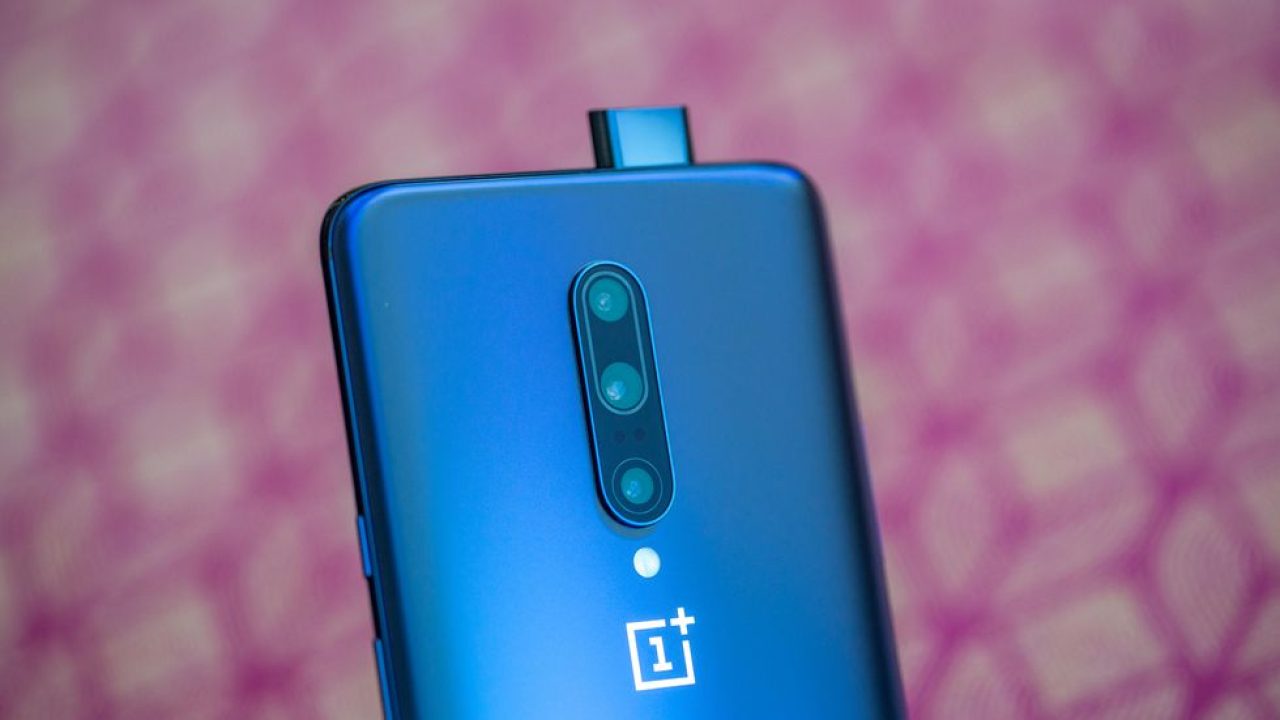
The phone’s design is modern and sleek. The front is almost entirely screen, thanks to the hidden pop-up selfie camera. The back houses a triple-camera setup with a main lens, ultra-wide lens, and telephoto lens. The power button and the alert slider are located on the right, while the volume buttons are on the left. The USB-C port, speaker, and SIM tray sit at the bottom. This setup makes the phone easy to handle despite its size.
Setting Up the Device
To get started, insert a nano-SIM card using the SIM tray tool. Power on the device by holding the power button. On the first boot, the setup wizard guides you through choosing language, connecting to Wi-Fi, and signing in with your Google account. OnePlus Switch makes it easy to transfer contacts, messages, photos, and apps from your old phone.
Display Experience
One of the highlights of the OnePlus 7 Pro is its Fluid AMOLED display. At 6.67 inches, it offers sharp visuals with high resolution and HDR support. The standout feature is the 90Hz refresh rate, which makes scrolling and gaming incredibly smooth. Display settings include Reading Mode, Night Mode, Video Enhancer, and options for screen calibration. The curved edges give the phone an immersive feel and make media more enjoyable.
Camera Features
The phone includes a pop-up front camera that allows the main display to remain notch-free. The triple rear camera system is made up of a 48MP main lens, a telephoto lens for zoom, and an ultra-wide lens for landscapes. Shooting modes include Portrait, Panorama, Pro Mode, Time-lapse, Slow Motion, and Nightscape for low-light photography. Video recording supports 1080p and 4K at multiple frame rates, giving users flexibility for different projects.
Battery and Warp Charge
With a 4,000 mAh battery, the OnePlus 7 Pro is built to last through the day. Even with heavy use, the device holds up well thanks to efficient battery optimization. Warp Charge 30 is one of its best features, offering extremely fast charging speeds through the USB-C port. A quick 20–30 minute charge provides hours of use. To protect the battery, it’s recommended to charge within normal temperature ranges and avoid extreme heat or cold.
Buttons and Shortcuts
The phone supports several physical and software shortcuts:
- Power button: Hold to restart or power off, double-press to open the camera.
- Alert slider: Instantly switch between Ring, Vibrate, and Silent modes.
- Volume keys: Adjust volume, silence calls, and take photos in camera mode.
- Quick actions: Press Power + Volume Down to take a screenshot, or Power + Volume Up to force restart.
These shortcuts make the device quick to navigate without needing menus.
OxygenOS and Software
OxygenOS, based on Android, provides a clean and fluid user experience. It comes with customization options, smooth gestures, and quick updates. Notable features include:
- Zen Mode: Temporarily locks you out of your phone to encourage breaks.
- Gaming Mode and Fnatic Mode: Optimize performance while gaming by reducing distractions and improving network stability.
- Parallel Apps: Allows you to run two accounts of the same app.
- App Locker and Hidden Space: Keep apps private with password protection or hide them entirely from the main drawer.
These features add convenience, privacy, and control to the everyday smartphone experience.
Connectivity Options
The OnePlus 7 Pro supports Wi-Fi, Bluetooth, NFC, and dual-SIM capabilities. It can serve as a personal hotspot with options for 2.4GHz or 5GHz bands. Bluetooth works with a wide range of accessories, and NFC allows easy mobile payments and file sharing. Users can also set up Tap & Pay with apps like Google Pay.
Security and Unlocking
Security is handled with an in-display fingerprint sensor and face unlock. The fingerprint scanner is fast and accurate, while face unlock provides a quick and simple alternative. Additional options include PIN, password, or pattern lock. Google Play Protect and Find My Device are supported for added peace of mind.
Sound and Media
For the first time in a OnePlus device, the 7 Pro introduced stereo speakers. Combined with Dolby Atmos, the audio quality is strong and clear for both media and gaming. While the headphone jack is not included, Bluetooth connectivity supports high-quality audio formats. This makes the phone excellent for entertainment.
Performance and Gaming
Powered by the Snapdragon 855 processor and up to 12GB of RAM, the OnePlus 7 Pro is built for speed. It handles multitasking easily and runs heavy games without lag. With features like RAM Boost and UFS 3.0 storage, app loading times and system performance are among the best in its class. The cooling system ensures the device doesn’t overheat during extended gaming sessions.
Backup, Updates, and Recovery
The phone supports over-the-air updates and also allows manual updates through local upgrade files. Data can be backed up using OnePlus Switch or Google Drive. If needed, a factory reset option restores the phone to its original state, though it is important to back up files before doing so.
Accessibility Features
Accessibility options include magnification gestures, color inversion, high-contrast text, and color correction modes for people with vision challenges. The power button can be set to end calls, and other tools help those who need extra support using the phone.
Safety and Care
The OnePlus 7 Pro comes with safety guidelines to keep the device and its users secure. It should not be exposed to extreme temperatures, water, or dust. Charging should be done with the official Warp Charge accessories to avoid damage. The device is not fully waterproof, so care should be taken to avoid immersion. Warranty details cover defects but not damage caused by accidents or misuse.
For users who want step-by-step instructions, advanced settings, or detailed safety guidelines, the official OnePlus 7 Pro PDF manual is the best resource. It includes full explanations of setup, features, and care tips straight from the manufacturer. You can download Here: OnePlus+7+Pro to keep it handy on your device or computer for quick reference anytime.
Here’s a set of FAQs you can use in your article. I’ll give them in plain text first, then show the JSON-LD schema markup.
FAQs for OnePlus 7 Pro
Q1: How do I insert a SIM card in the OnePlus 7 Pro?
A: Use the SIM eject tool to open the SIM tray, place the nano-SIM inside, and reinsert it carefully before powering on the device.
Q2: Does the OnePlus 7 Pro support wireless charging?
A: No, the OnePlus 7 Pro does not support wireless charging. It uses Warp Charge 30 for very fast wired charging.
Q3: How do I take a screenshot on the OnePlus 7 Pro?
A: Press the Power button and Volume Down button at the same time to capture a screenshot instantly.
Q4: What is the refresh rate of the OnePlus 7 Pro display?
A: The OnePlus 7 Pro features a Fluid AMOLED display with a 90Hz refresh rate for smooth visuals.
Q5: Can I download the PDF manual for the OnePlus 7 Pro?
A: Yes, you can download the official OnePlus 7 Pro PDF manual, which includes setup, features, and safety instructions.
